
Account Lifecycle
Understand how accounts transition through different states from creation to closure.
When you create an account on the platform, it enters a lifecycle consisting of well‑defined states that determine whether the account is operational and can transact. You should track these states to understand account readiness and to programmatically respond to changes (e.g., via webhooks or API responses).
How It Works
- Account creation triggers the lifecycle — every account starts in the
INACTIVEstate. - The platform evaluates KYC verification and compliance requirements.
- Based on verification outcomes, the account transitions to a final state (
ACTIVE,BLOCKED, or remainsINACTIVE). - Accounts can later enter a closure workflow, progressing to
CLOSED.
Each status conveys whether the account can receive, hold, or send funds, and whether it requires action.
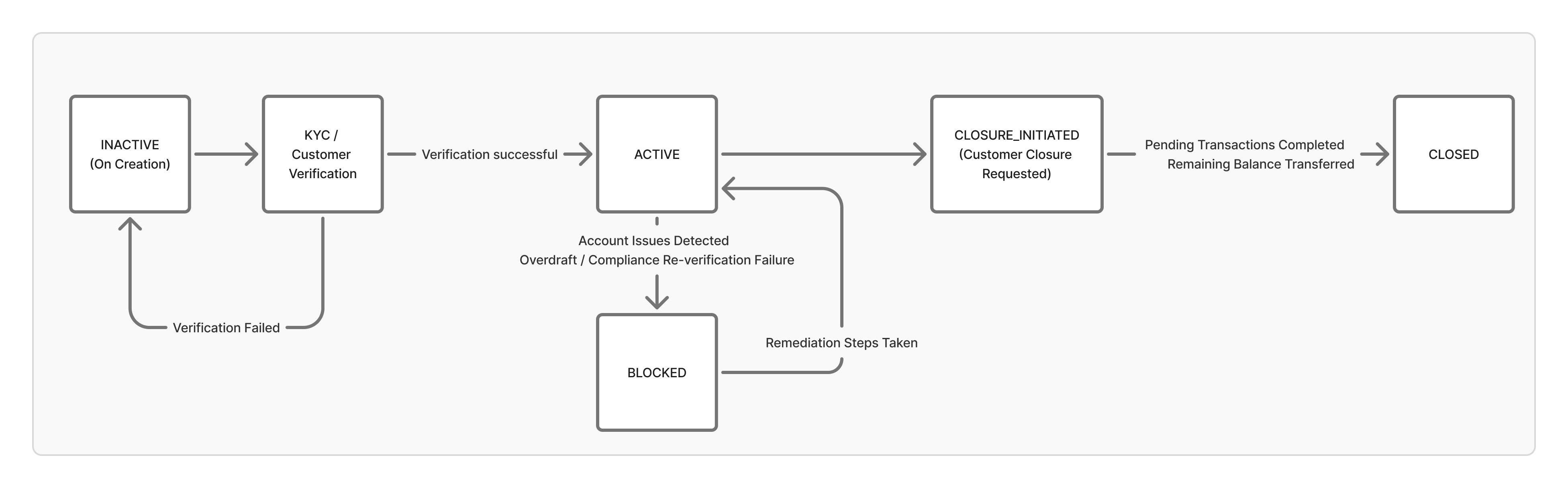
Account Statuses
| Status | Description |
|---|---|
| INACTIVE | Account has been created but is not yet verified for KYC or compliance. No fund movements are permitted. This is the default state at creation when verification hasn’t yet succeeded. |
| ACTIVE | All required verification and compliance checks have passed (including KYC). The account is operational for sends, receives, and balance activity. |
| BLOCKED | The account cannot transact until remediation actions are taken. This may occur due to
|
| CLOSURE_INITIATED | A temporary state when the account holder has requested closure. The system is completing pending transactions and preparing final balance transfers. |
| CLOSED | The account is permanently closed. All transactions are settled, and any remaining balance has been moved out. |
Troubleshooting Account Status
Some account statuses require remediation or action before the account can become operational. You should monitor these statuses and guide users or system processes to resolve issues.
INACTIVE
Account has been created but is not yet operational. Typically occurs when KYC or compliance verification has not completed successfully.
Possible Causes & Steps to Resolve:
| Reason | Remediation |
|---|---|
| KYC / customer verification pending | Check the customer’s verification status. Request missing documents or follow up on review if pending. Both OFAC and CIP status of the customer should be Verified |
| SPAA / account agreement not linked | Ensure the customer has submitted the required agreement and it has been processed. |
| Compliance documentation under review | If a customer submits wetsigned agreement and doesnt follow clickwrap e consent flow, then compliance review is triggered. Usually account is activated within a day, you should trigger follow-up if review is delayed. |
Tip: Use Account webhooks to monitor status and customer webhooks to monitor verificationStatus. INACTIVE accounts should not be used for transactions until remediation is complete.
BLOCKED
Account has been restricted due to failed compliance checks, risk events, or operational issues. No transactions are allowed until the account is unblocked.
Possible Causes & Steps to Resolve:
| Reason | Remediation |
|---|---|
| OFAC, CIP, or other compliance checks failed | Identify the specific failed check from the verification status. Resolve issues (e.g., update documentation, clear sanctions flags). |
| Suspicious activity or risk review | Reach out to customer support to know the reason. |
| Negative balance restrictions | Resolve negative balances by depositing funds, the risk block will be removed. |
Tip: BLOCKED accounts are explicitly restricted. Unlike INACTIVE accounts, they may require manual intervention by compliance or risk teams.